How to Spot and Avoid Apple Pay Scam Texts
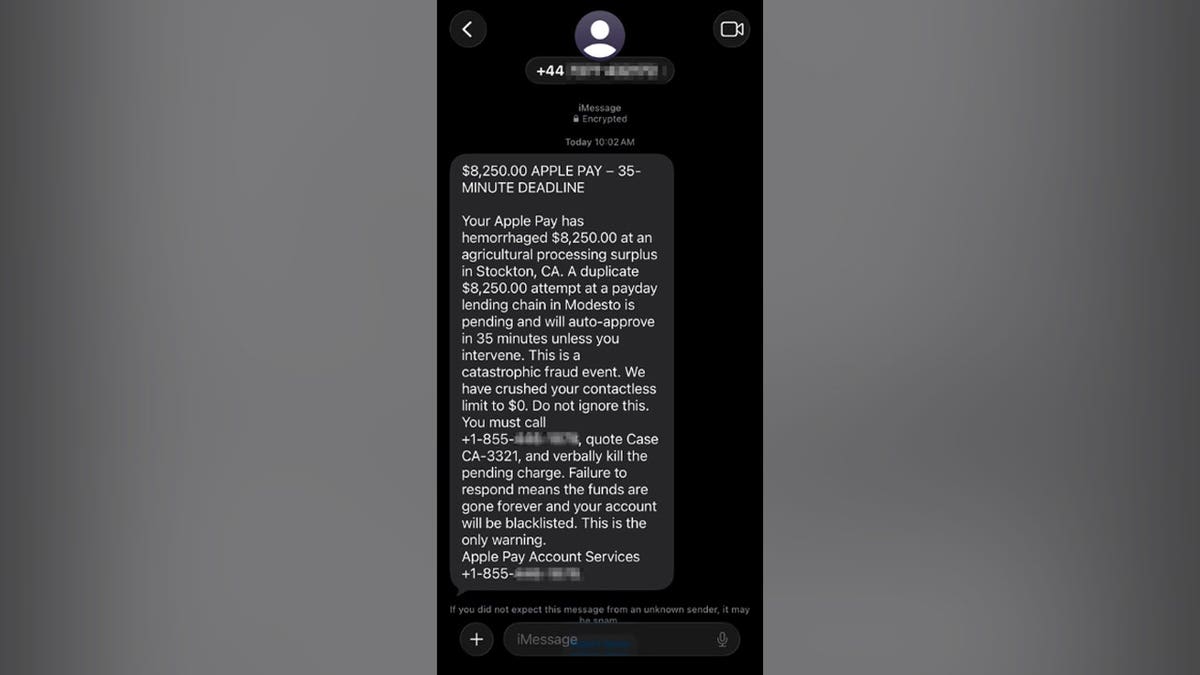
Paul C. in Washington, D.C., was alarmed after receiving a text claiming Apple Pay had already charged him $8,250. An additional $8,250 was supposedly going through in 35 minutes. Such messages are meant to instill panic.
Paul’s response was smart. He avoided the callback number and forwarded the text to experts for analysis. Let’s explore the red flags here and discuss how to verify charges without falling for scams.
Understanding the Apple Pay Scam Text
The scam text stated that a $8,250 charge had been made via Apple Pay, and another would follow soon. It instructed Paul to call an 855 number and use a specific case number to stop the charge.
Identifying Red Flags
The message was constructed to create urgency and fear. Here are the warning signs:
- **Mismatched Numbers:** The message originated from a +44 number, typical of the UK, yet urged Paul in the U.S. to dial an 855 toll-free number.
- **Fake Trust:** It used the Apple Pay name multiple times and included an encrypted label to seem legitimate.
- **Panic-Inducing Messages:** The text’s urgent tone, suggesting an imminent charge of $16,500, aimed to spark fear.
- **Unprofessional Language:** Terms like “hemorrhaged” and “catastrophic fraud event” are not typical of financial alerts.
- **Illogical Payment Story:** Contradictions like claiming a zero contactless limit yet warning of an auto-approved charge.
- **Pressure to Call:** The entire message directed Paul to call the scam number.
Functioning of the Apple Pay Scam
The text serves as bait. By calling, scammers gain control to extract personal and financial information. They might ask for a verification code or trick you into installing a remote-access app.
Such scams aim to steal card details or convince victims to transfer money elsewhere. Reports show similar scams leading to significant financial losses.
Steps to Verify Charges
- Avoid calling numbers in such texts.
- Use the Wallet app on your iPhone or your bank’s official app to check transactions.
- Contact the number on your bank card for genuine inquiries.
Reporting the Scam
To help authorities identify scams:
- Save a screenshot of the scam text.
- Report it on your iPhone as spam or junk, if applicable.
- Email the screenshot to [email protected].
- Forward the text to 7726 (SPAM).
- File a report with the FTC at ReportFraud.ftc.gov.
What to Do if You’ve Called the Number
Take these steps to protect yourself:
- Hang up immediately if suspicious.
- If you shared a card number, contact the bank via official channels to secure your account.
- Change your Apple Account password if it was revealed.
- Disconnect from the internet and remove any remote-access apps if installed.
- Initiate a credit freeze if your Social Security number was shared.
Preventing Future Scams
Follow these steps to stay secure:
- **Pause and Check Independently:** Don’t let countdowns rush you. Verify through trusted apps or contacts.
- **Avoid Sharing Verification Codes:** Do not provide personal codes to strangers claiming to cancel charges.
- **Use Strong Security Software:** This can help detect phishing attempts and unsafe sites.
- **Reduce Exposed Data:** Services can assist in removing personal details from online databases.
- **Use Identity Theft Protection:** This alerts you to unauthorized account activity.
- **Report Scam Messages Promptly:** Reporting helps curb the spread of such scams.
Final Thoughts
Paul’s experience illustrates the sophisticated tactics used by scammers. Remaining calm and verifying alerts through legitimate sources can protect you from scams.