Protect Yourself from MyChart Phishing Scams
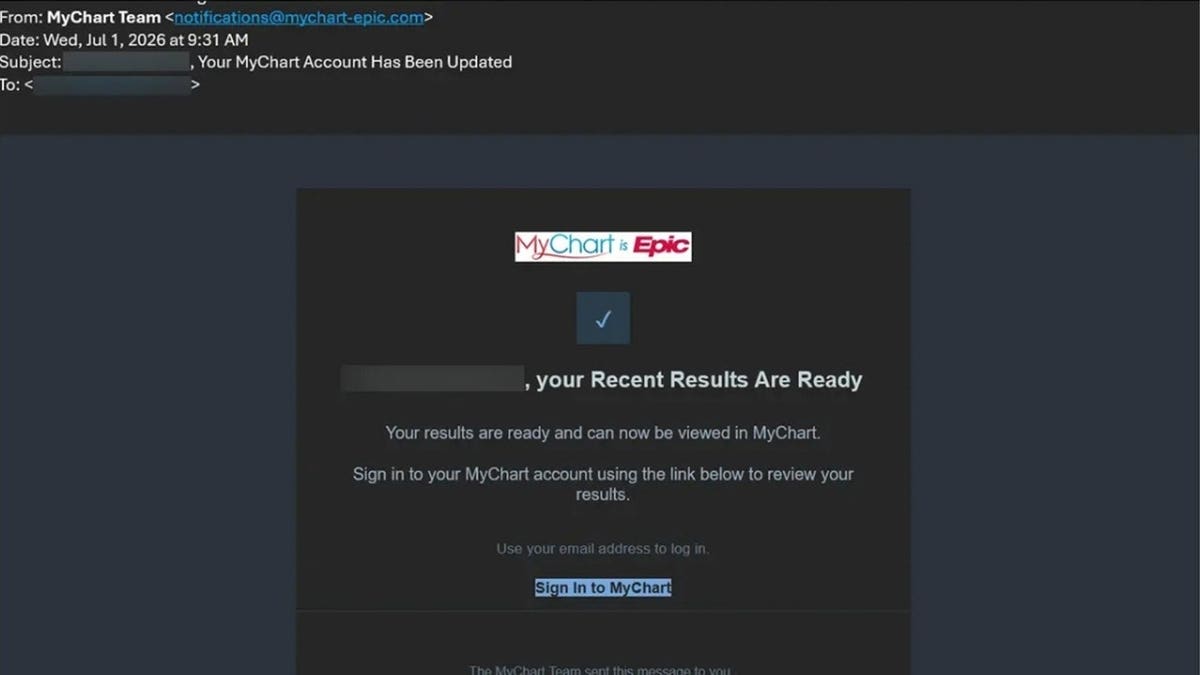
Many people use MyChart, a popular patient portal by Epic, to access health information and communicate with care teams. Recently, there has been increasing concern about scams targeting MyChart users. Criminals impersonate MyChart through phishing campaigns, but these do not involve a breach of the MyChart platform itself.
Understanding MyChart Phishing Scams
Scammers exploit the trust in patient portals by using fake medical results and bogus Medicare offers. One version aims to steal login details and potentially installs malware on Windows computers.
How the Scam Works
The scam starts with an email mimicking MyChart, presenting a message saying “Your recent results are ready.” This email leads to a counterfeit sign-in page. If you enter your credentials, scammers capture them. After logging in, fake medical records are shown to incite panic.
Malware Installation
Some fake MyChart sites instruct Windows users to run commands that install malware. Therefore, patient portals should never ask users to download programs to reveal a diagnosis.
Stay Alert for Fake Medicare Health Kits
Another scam involves fake offers of “Medicare Health Kits.” These messages push recipients towards providing personal details under the pretense of free giveaways. No such kits exist, and details like credit card information may be requested.
How to Protect Yourself
- Use the official MyChart app or healthcare provider’s website to review new results.
- Inspect the sender’s full email address. If suspicious, contact your healthcare provider using a trusted number.
- Do not follow computer command instructions from patient portals.
- Activate two-step verification for MyChart accounts.
- Use distinct passwords for MyChart and other accounts, preferably managed by a password manager.
- Ensure security protection on all devices. Keep software updated.
- If a message claims urgent medical issues, verify through MyChart app or by calling your healthcare provider.
- Be cautious of emails promising free giveaways under MyChart’s name.
Steps to Take if You Interacted with a Scam
- If you clicked but did not enter data, close the page and mark the email as junk.
- If you provided your password, change it via the official MyChart portal and update contact information.
- If you disclosed financial information, contact your bank immediately.
- If you ran commands or downloaded programs, disconnect from the internet, conduct security checks, and change important passwords using a different device.
- For incorrect medical records, contact your healthcare provider and insurance company.
Exercise caution and skepticism with unexpected health-related alerts.