Beware of QR Code Scams in Phishing Emails
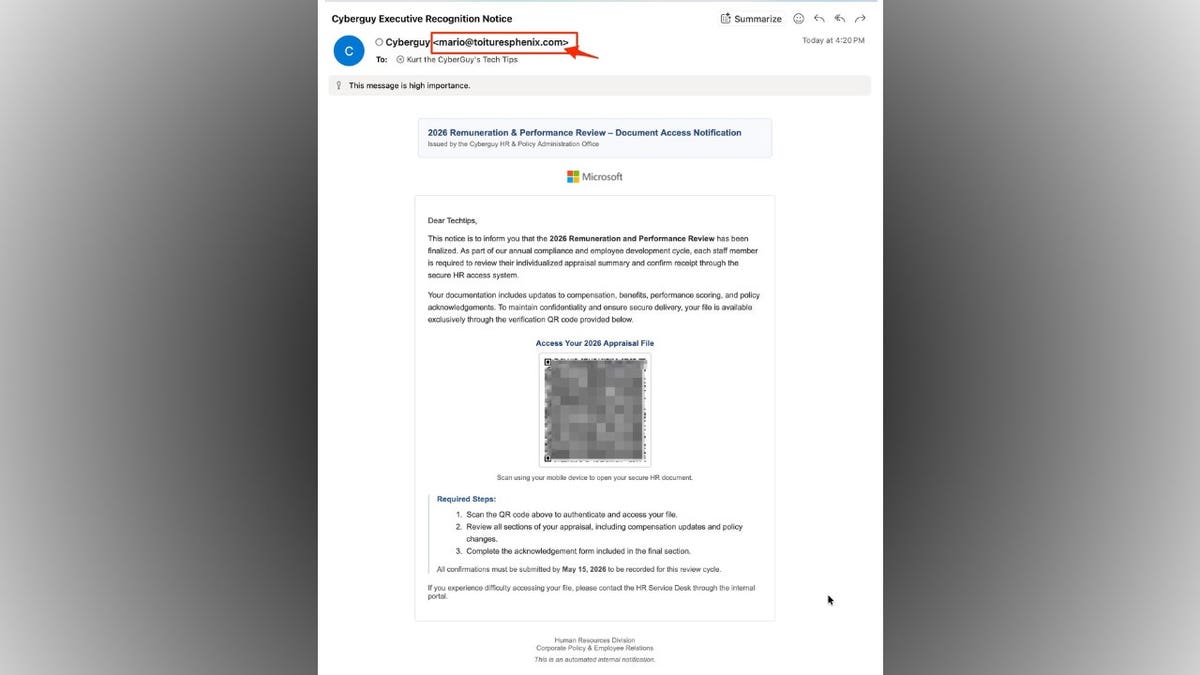
Recent phishing scams disguise themselves as official HR notices about performance reviews. These emails mention pay updates, benefits, and deadlines. A QR code is included, supposedly leading to your file. However, using this code redirects you to a phishing page designed to capture your login details.
Identifying Red Flags in these Emails
Phishing emails are crafted to seem routine and urgent. Look closer, and certain warning signs become apparent:
- Sender’s Email: The sender’s email address does not match the company’s domain. For example, an email from ‘[email protected]’ claims to represent a reputable brand.
- Urgency: The email creates urgency with a deadline, urging action by a specific date like May 15, 2026.
- QR Code Action: The email encourages scanning a QR code for access, a technique called “quishing.”
- Generic Greeting: The email uses a generic greeting such as “Dear Techtips.” Legitimate messages usually address you by name.
- Vague System Language: The email references a “secure HR access system” without naming a recognizable platform.
- Inaccurate Branding: Includes familiar logos but with inconsistent formatting, not matching company templates.
- High Importance Mark: Email is marked as high importance, further urging quick action.
- Instructions Deviate: Directs you to scan and access a file instead of using a secure login system.
Why QR Code Phishing is Increasing
QR codes are widespread, used in restaurants and airlines, which decreases suspicion. Scammers exploit this trust, embedding malicious links within codes.
Consequences of Scanning Malicious QR Codes
If you scan a malicious code, potential outcomes include:
- Providing login details unknowingly
- Downloading malware silently
- Being prompted for additional personal information
Attackers can then infiltrate company systems or target your contacts.
Staying Safe from QR Code Email Scams
Adopt these precautionary measures:
- Avoid Unexpected QR Codes: Always verify URLs via official sites instead.
- Check Sender Domains: Inspect the full email address, not just the display name.
- Use Known Login Paths: Access HR systems directly using familiar URLs or bookmarks.
- Be Wary of Generic Greetings: Mass phishing emails often avoid real names.
- Verify Suspicious Emails: Contact your HR department using known methods.
- Install Strong Antivirus Software: Use antivirus to block malicious links and pages.
- Consider Data Removal Services: Reduce exposure by removing personal data from broker sites.
- Keep Devices Updated: Enable automatic updates to protect against vulnerabilities.
- Enable Two-Factor Authentication: Add a verification step before login access.
Join free online classes like ‘Lock Down Your Phone in 30 Minutes’ to learn security fixes. Phishing tactics evolve constantly. Avoid paths given by emails when dealing with sensitive data. Take control by choosing known, secure methods.
Send feedback and questions to CyberGuy.com.